
Streamline investigations, standardize reports, and simplify data collection.>
Automated Reporting and Template Builder for Engineering Investigations
01/06 Project Context
This company operated in the automotive and mechanical engineering sector, where OEM and client requirements changed rapidly. Every development phase, quality investigation, or field claim required detailed, traceable reports — and the reporting volume grew fast.
At the time, engineers created investigations in Word or Excel and exported PDFs. Each author followed their own format, so clients often received different layouts for the same type of request. That inconsistency damaged client confidence and made internal analysis extremely difficult.
When analysis was needed, engineers manually extracted values from multiple PDFs into spreadsheets to recreate datasets for charts and calculations. This process was slow, error-prone, and demotivating — and the problem scaled with every component, subassembly, and test iteration.
The company needed a way to standardize reporting, capture reusable engineering knowledge, and enable direct, data-driven analysis — all while fitting the existing CMS constraints and the engineering workflows already in place.
Summary
- Standardize report creation across projects and departments to deliver consistent outputs to clients.
- Introduce a UI-driven template builder that allows engineers to design investigation templates visually.
- Embed analysis via measured values, formulas and charts to eliminate manual Excel work.
- Support bundles and cloning for multi-component investigations and repeated use-cases.
- Provide governance through an approval/revision workflow so templates remain consistent and auditable.
- Enable filtering & analytics across cloned reports using multi-option fields and date ranges.
02/06 Challenges
The main problem was a broken reporting ecosystem: inconsistent templates, manual data extraction, and no centralized way to analyze or reuse investigation data. This created wasted effort and increased risk of human error.
Additional constraints: the solution had to integrate with existing systems (customer lists, sample investigation records), avoid introducing backend exposure for regular users, and work inside the limits of the current CMS.
Inconsistent Templates
Clients received different deliverables depending on who wrote the report, which reduced professionalism and trust
Time-Consuming Analysis
Engineers spent large portions of time aggregating values from PDFs into Excel to create charts and run calculations.
Collaboration & Governance
There was no consistent revision, approval, or reuse workflow — authors worked in silos and templates diverged.
Scalability
The reporting approach had to scale across many components, repeated tests, and different project phases without exploding admin overhead.
03/06 Solution
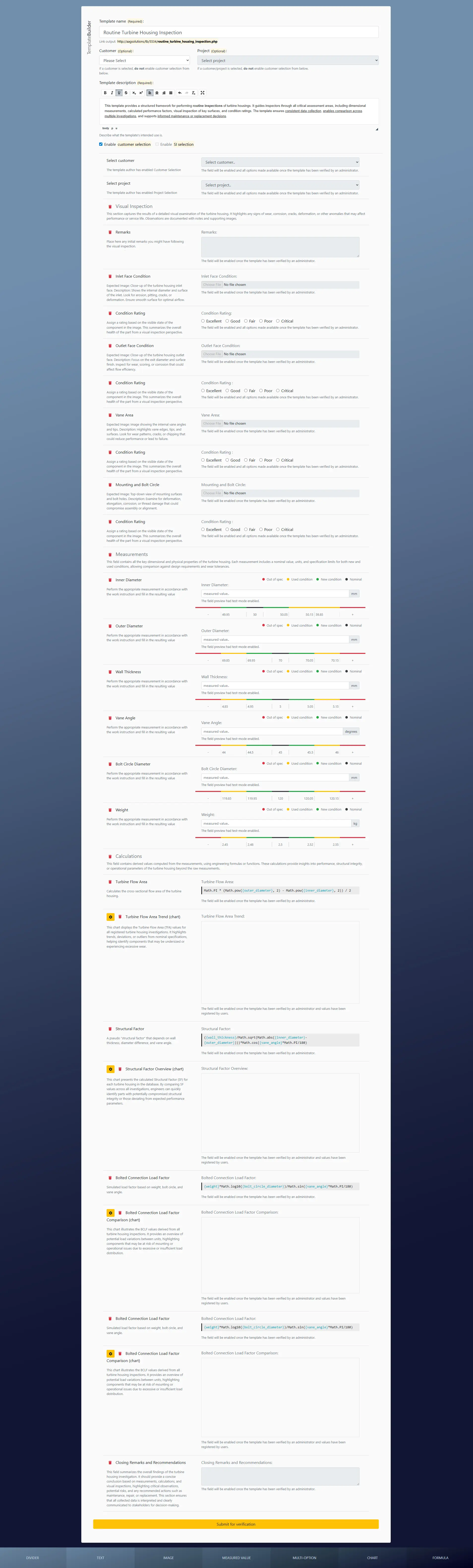
I designed and implemented a Template Builder System that lets authors visually compose investigation templates using UI elements (divider, text, image, measured value, multi-option, formula, chart). The builder runs in the CMS but produces a pseudo-code representation of the template behind the scenes.
During authoring every action appends a specially escaped string into a hidden field. This pseudo-code preserves the intended layout and logic while preventing the CMS from executing it prematurely. When an author submits a template it is stored for review and an admin is notified.
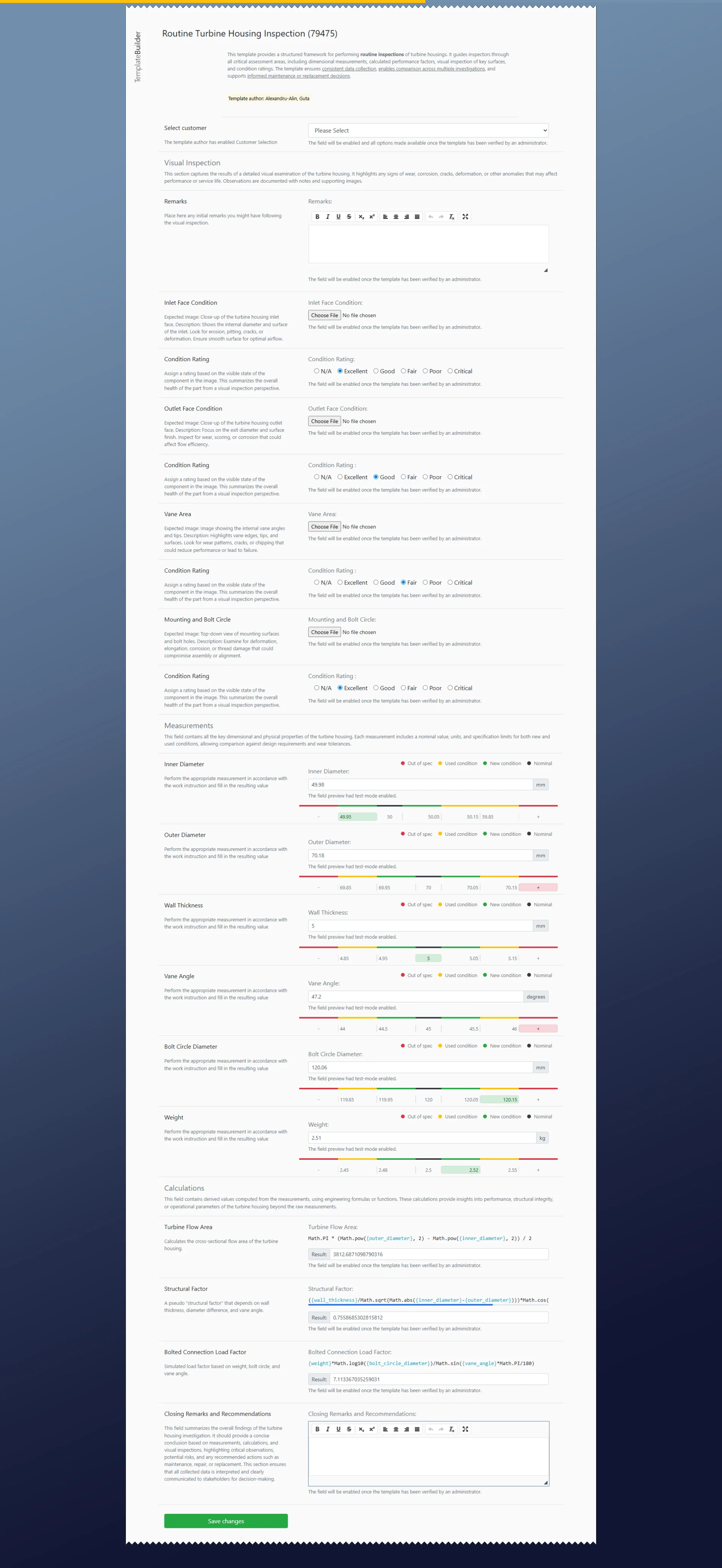
On approval I implemented a server-side compile step that strips the escape characters, recomposes the CMS-compatible template file, registers it, and notifies the author. At that point the template is fully functional and clonable: engineers can create instances, fill fields, attach evidence, run formula-driven calculations and visualize results with built-in charts.
To handle multi-component investigations, I added a template bundle feature. Bundles group templates into a guided workflow so project engineers can systematically work through all required reports for main components and subassemblies while still allowing each template to be used standalone.
Drag-and-Drop Builder
Authors compose pages visually. Elements can be dragged, reordered, and edited; each element adds its pseudo-code to a hidden payload that gets submitted for validation.
Approval & Revision Workflow
Admins validate pseudo-code, publish approved templates, and manage revisions. Authors can request changes; templates can be discontinued and versioned to preserve traceability.
Cloning & Bundles
Published templates become clonable pages. Bundles guide the investigator through multiple templates, ensuring no component is missed and allowing aggregated reporting across the bundle.
04/06 Key Functionalities
The builder exposes a set of field types and features tailored for engineering investigations. Below are the core building blocks and how they support analysis and governance.
Metadata & Setup
Template name (required), description (required), optional links to a customer or project, and toggles to enable customer or sample investigation selection drawn from external systems.
Measured Value
Define a measurement with unit, nominal value, and separate tolerance ranges for new and used conditions. The measured value is stored as structured data and drives charts and formula inputs.
Formula
Authors can compose complex formulas referencing measured fields. Formulas compute on-the-fly for each clone instance, eliminating manual spreadsheet calculations.
Chart
Automatic line or bar charts can be bound to one or more measured/formula fields. Charts update dynamically and can be used in single-entry view or aggregated across clones for trend analysis
Multi-Option
Define options with a pipe-separated list (e.g., A | B | C). These render as radios/checkboxes for users and also act as filter dimensions for cross-clone analysis and reporting.
Content Elements
Dividers, text blocks and image upload fields support readability and evidence embedding, so reports are both analytical and presentable to clients.
05/06 Technical Aspects
Implementing this builder required creative engineering to work within the CMS limitations while maintaining robust behavior and data integrity. The system relies on pseudo-code strings stored in hidden fields during authoring; these strings carry both layout and field metadata.
On submission the template payload is saved server-side and marked for admin review. The publish step performs a safe compilation: escape markers are removed, CMS-compatible tags are generated, the template file is written to the server and registered so clone pages render as real, interactive forms.
For runtime behavior, each cloned page maps stored structured values into UI components (inputs, charts, computed fields). Multi-option fields and date ranges power the filtering engine used for aggregated queries. Extensibility was a priority — new field types can be added with minimal changes to the compile/render paths.
Integration points include customer lists and sample-investigation records, making it possible to attach templates to external entities and ensure traceability between systems.
06/06 Outcome & Reflection
The Template Builder transformed how investigations were produced and analyzed. Reports became consistent, professional, and immediately usable for analysis. Engineers no longer manually reassembled datasets from PDFs; instead, they worked with structured, queryable data.
Bundles made multi-component investigations systematic and less error-prone, reducing the chance that a component would be overlooked. The approval workflow maintained quality without stifling author creativity.
Reflection: the project underscored that the best tools reduce friction at the point of data entry. By embedding analysis directly into reporting, the builder changed reports from passive documents into active engineering assets.
Lessons Learned
- Empowering engineers to author templates drives adoption, but governance (approval/revision) is essential to preserve consistency.
- Designing structured fields (measured values, formulas) at entry reduces downstream cleanup and analysis time drastically.
- Modular, compile-and-render architecture lets the system grow — new field types or chart variants can be introduced without broad rewrites.
- Bundles are a powerful abstraction for multi-component projects and should be considered early in domain modeling for similar systems.
- Working within CMS constraints forces elegant engineering decisions — the escape/pseudo-code model preserved flexibility while maintaining safety.
WRITE
contact@a-ag.nl
support@a-ag.nl
CALL
+31 (0) 645 632 583
+31 (0) 645 632 583
A-AG
99673592
NL005402899B82